Analytics > Cognytics
Cognytics is the data analytics platform that, when partnered with your application data, can use your collected sales, inventory, and financial records to provide actionable and real-time insights into the health of your business. The dashboards in Cognytics can reveal patterns and localized trends hidden in your Point of Sale, Inventory, Purchasing, Accounts Receivable, and, for Spruce customers, Accounts Payable and other platform-specific data. You can identify patterns in inventory demand, seasonal performance, margin shifts, and vendor behavior to maximize profitability and margins, improve operational efficiency, and provide near-real-time customer insights. It can reduce the need for manual reporting, freeing up staff to focus on more strategic planning and identifying new opportunities.
For businesses with multiple locations, Cognytics helps drill down into regional and local metrics to understand how each location performs, what customers collectively look for, and what each store excels at. These insights will benefit your entire team, enabling you to make smarter decisions faster, reduce costs and risks, and increase profitability. Ultimately, this tool can help you scale your operations profitably using real-time, data-driven facts.
Cognytics contains a series of dashboard widgets (charts and tables) that show your current sales and inventory information based on the data your team enters into RockSolid MAX every day. ECI updates these dashboards nightly, using the new figures added during the day, making it easier for you and the decision-makers in your store to see the big picture of your sales and inventory. This hosted feature provides a secure platform to review the daily sales, costs, and inventory information in a daily, monthly, and yearly context. This dashboard contains the most frequently used reports to give you a quick but thorough assessment of your store’s financial status and current trends.
The Implementation or Support teams set up the Cognytics infrastructure for you. You decide which users on your team have access to these dashboards, using the instructions in Adding Roles and Users.
The Implementation or Support team must set up the infrastructure for this feature for you. Speak to your After-Market Salesperson about pricing and your user needs to get started.
Accessing Cognytics
For users with access to Cognytics, you can access it from the Toolbar menu item, Analytics.

Toolbar Menu > Analytics > Cognytics
After you click the Cognytics menu option, the landing page displays.
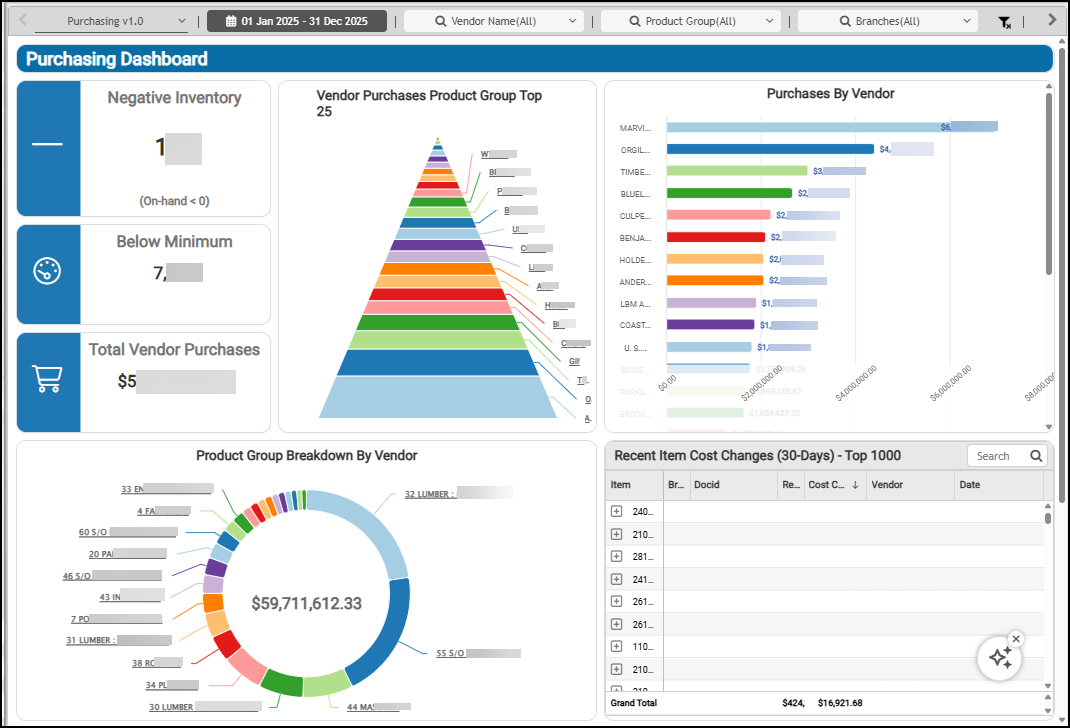
Otherwise, a message displays indicating that you cannot access this feature. System Administrators can learn more about adding roles and user permissions in Cognytics here.
What Cognytics Dashboards are available?
Analytics dashboards and their component charts are loaded on customer systems into a separate database. The following links to documents explain the various dashboards (collections of charts/graphs) that we offer. If you are unable to find a particular dashboard or notice differences, please reach out to your System Administrator to see if the Dashboard you are looking for is available for your needs, see Accessing the Cognytics Dashboards.
Can I make my own Widgets and Dashboards?
There are different types of licenses for the this software. Your admin license (included) allows the admin user to perform all functions including creating new charts and changing existing ones. In addition, the most recent versions of existing charts, as well as any new one's, are available from the web site. To learn more about creating dashboards and widgets that are custom for your business, see Building Custom Cognytics Modules.
What if I need help or would like a custom chart (widget)?
We are looking to expand our library and the use of the Analytics feature. If you have ideas for charts or questions about Analytics, please contact support_spruce@ecisolutions.com. We can either provide some coaching so you can create the chart yourself or you can work with our Data staff to build the chart for you. Development fees may apply depending upon the time required for this support.
Adding User and Admin Licenses
One admin license is included with all contracts. This provides both administrator and user level access to the analytics software. Four license categories are available: Administrator, Analyst, User, and Viewer. You can purchase additional licenses when you need them for an additional monthly support charge. Please contact the ECI After-Market Sales department for current pricing and support fees.