Purchasing > Process Order Document > Order Tab
You can use the Purchase Order Document Order tab to specify the the items in the purchase order have been ordered based on the transaction.
The Order (ALT-O) tab displays the purchase order document ID, vendor code, terms code (and description), due date, and the Mark as ordered status flag. The Mark as ordered flag is important; it determines whether this purchase order (when saved) should or should not affect each ordered item's "on-order" quantities. Typically, you choose the Mark as ordered flag when you are ready to submit the PO to the vendor (after all additions and changes have been completed, for example).
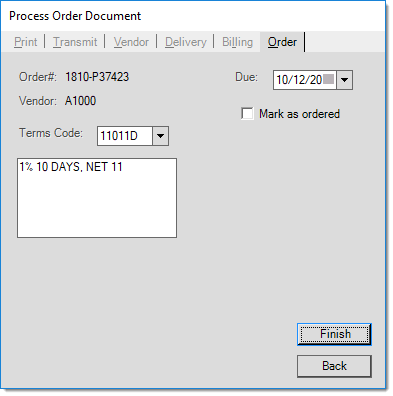
Process Order Document: Order Tab
Order #
The document identifier assigned to this purchase order. Document identifiers consist of two elements separated by a dash (-).
The first element, four-digits, is automatically set and represents the year and month (YYMM) that the document was created during.
For example, a document that starts with "2612" indicates that it was created in December of 2026.
The second element, six-characters, is the "sequence" part of the document. This element can include numbers and letters. For purchase orders, it can be either automatically set or manually entered. Optionally, the sequence can include an automatic prefix assigned that is determined by the type of document and the branch (location).
Vendor
The vendor (code) assigned to this purchase order. Vendors can be added from the Vendor Maintenance form available from the Database menu in Purchasing.
Terms Code
In this case, Terms Codes apply to the Payable discount terms, and indicates the discount percentage (if added), discount date (if added), and due date for payment of the purchase to the vendor (or pay-to vendor). Terms Codes are optional and may be assigned to a vendor so that they are automatically associated with that vendor's purchases. You can also add a Terms Code manually, if it applies to a purchase order. Terms Codes are defined in the Terms Code Maintenance form.
The text description assigned to the terms code (if any) is shown the text area below the drop down control. The text description for a terms code is manually determined by the user who created the terms code and does not necessarily reflect the actual settings of the code in question.
Due
This indicates the expected delivery date of the order (when it is due to be received). This is not related to payment. The due date of purchase orders can affect purchasing calculations for PO Builds since it is used in the calculation of POQDue quantities (upcoming purchases). This is done so that purchases due in the recent future are not used when determining quantities needed for ordering, for example.
Mark as Ordered
This check box determines whether the items associated with this purchase order should affect on-order quantities. Items are not considered "on-order" until the purchase order is saved with this check box checked. Purchase orders generated as a result of special orders on customer orders are not automatically set as "ordered". Processing a PO transaction without selecting this check box can cause EDI-based issues, so we recommend that you select this check box.